
En una entrada de la semana pasada vimos como el nuevo Oracle Linux 7 y RedHat 7 han decidido cambiar los servicios y las notaciones a un nuevo método con mejoras a mi entender altamente cuestionables.
Hoy vamos a ver como podemos cambiar los interfaces de red de esa notación a la notación clásica de linux ethX.
La instalacion por defecto de Oracle Linux 7 nos dejará unos interfaces de red tal que así
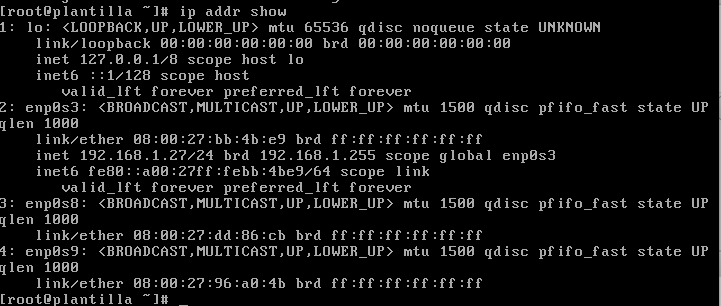
Para volver a tener nuestros interfaces de red con nuestros nombres habituales deberemos de hacer:
[root@alone ~]# vi /etc/default/grub
GRUB_TIMEOUT=5
GRUB_DISTRIBUTOR="$(sed 's, release .*$,,g' /etc/system-release)"
GRUB_DEFAULT=saved
GRUB_DISABLE_SUBMENU=true
GRUB_TERMINAL_OUTPUT="console"
GRUB_CMDLINE_LINUX="vconsole.keymap=es
crashkernel=auto vconsole.font=latarcyrheb-sun16 rhgb quiet "
GRUB_DISABLE_RECOVERY="true"
Y modificaremos la línea
GRUB_CMDLINE_LINUX="vconsole.keymap=es crashkernel=auto
 vconsole.font=latarcyrheb-sun16 rhgb quiet ”
añadiéndole net.ifnames=0 biosdevname=0 para que quede:
[root@alone ~]# vi /etc/default/grub
GRUB_TIMEOUT=5
GRUB_DISTRIBUTOR="$(sed 's, release .*$,,g' /etc/system-release)"
GRUB_DEFAULT=saved
GRUB_DISABLE_SUBMENU=true
GRUB_TERMINAL_OUTPUT="console"
GRUB_CMDLINE_LINUX="vconsole.keymap=es
crashkernel=auto vconsole.font=latarcyrheb-sun16 rhgb quiet net.ifnames=0 biosdevname=0"
GRUB_DISABLE_RECOVERY="true"
Tras esto ejecutamos la utilidad grub2-mkconfig -o /boot/grub2/grub.cfg
[root@alone ~]# grub2-mkconfig -o /boot/grub2/grub.cfg
Generating grub configuration file ...
Found linux image: /boot/vmlinuz-3.10.0-123.el7.x86_64
Found initrd image: /boot/initramfs-3.10.0-123.el7.x86_64.img
Found linux image: /boot/vmlinuz-3.10.0-123.9.3.el7.x86_64
Found initrd image: /boot/initramfs-3.10.0-123.9.3.el7.x86_64.img
Found linux image: /boot/vmlinuz-3.8.13-44.1.5.el7uek.x86_64
Found initrd image: /boot/initramfs-3.8.13-44.1.5.el7uek.x86_64.img
Warning: Please don't use old title `Oracle Linux Server, with Unbreakable Enterprise Kernel 3.8.13-44.1.5.el7uek.x86_64' for GRUB_DEFAULT, use `Advanced options for Oracle Linux Server>Oracle Linux Server, with Unbreakable Enterprise Kernel 3.8.13-44.1.5.el7uek.x86_64' (for versions before 2.00) or `gnulinux-advanced-533cf96e-16ad-48b4-b21f-955d13dcbf32>gnulinux-3.8.13-44.1.5.el7uek.x86_64-advanced-533cf96e-16ad-48b4-b21f-955d13dcbf32' (for 2.00 or later)
Found linux image: /boot/vmlinuz-3.8.13-35.3.1.el7uek.x86_64
Found initrd image: /boot/initramfs-3.8.13-35.3.1.el7uek.x86_64.img
Found linux image: /boot/vmlinuz-0-rescue-b231a9662b504ceb8b5883008ce1db77
Found initrd image: /boot/initramfs-0-rescue-b231a9662b504ceb8b5883008ce1db77.img
Y nos vamos al directorio /etc/sysconfig/network-scripts donde haremos:
mv ifcfg-enp0s3 a ifcfg-eht0
mv ifcfg-enp0s8 a ifcfg-eht1
mv ifcfg-enp0s9 a ifcfg-eht2
tras esto solo nos queda editar los ficheros ethX de toda la vida y ponerle los parámetros que queramos (entre ellos el parámetro «NAME») y ya tendremos los dispositivos renombrados con los nombres clásicos de Linux/Unix